
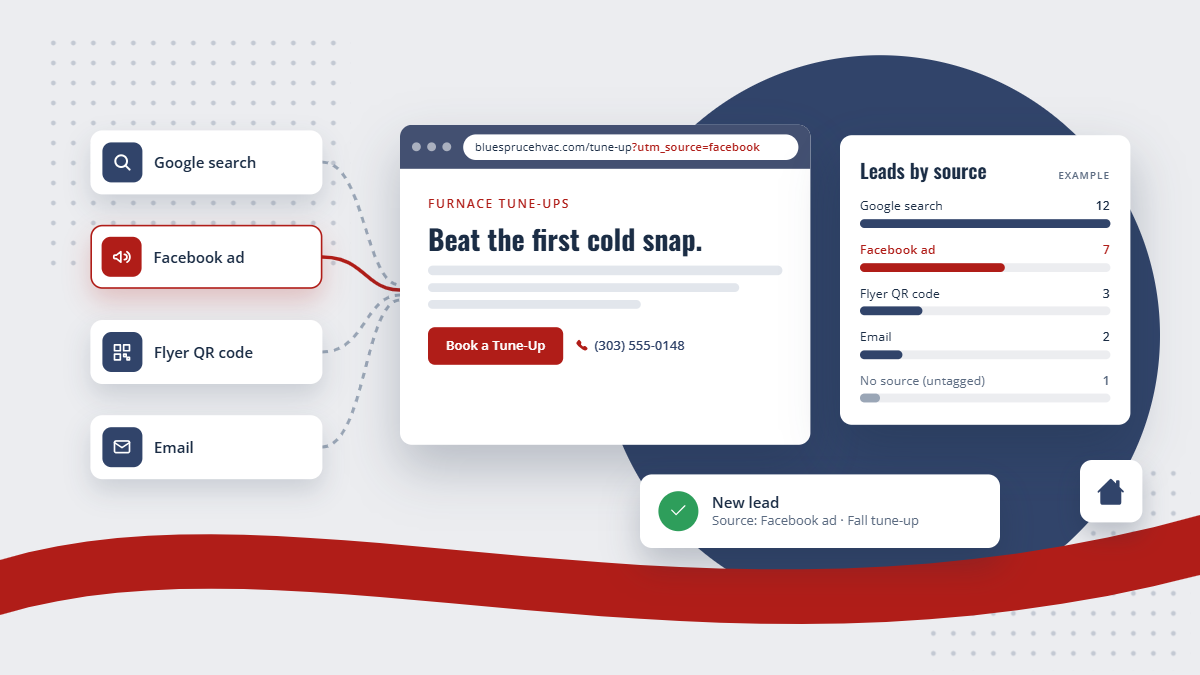
Ask most owners where their leads come from and the answer is "the website." That is where they arrived, not where they came from. The website is the front door. The question that matters for your budget is what sent them to the door.
Why "the website" is not an answer
A customer who found you through a Google search, one who clicked your Facebook ad, and one who saw your truck and typed in your address all land on the same site. If you count them all as "website," you cannot tell which of those efforts is working, and you keep paying for all of them.
Sorting visits by where they came from is the first step to knowing which marketing earns its keep.
The one habit that makes it work
Search engines and social sites pass along some information on their own, but your own campaigns need a label. That label is a tracking link: your normal web address with a few tags on the end saying where the link was used, for example the campaign name and the ad.
Use a tagged link everywhere you control the link: ads, emails, social posts, the QR code on a flyer. Ad platforms like Google and Facebook also add their own click IDs to the links in your ads, which tell you a visit came from a paid click rather than a free one.
THE SHORT VERSION
Put a tracking link on everything you control, then watch visits and leads by source. You cannot move money to what works until you can see which source sent each lead.
What you can see in LeadPointe
LeadPointe records where every visit to your site came from: search, social, other websites, or a tagged campaign or ad. Website statistics show visits and leads side by side, broken down by source, by campaign and ad, by the page people landed on, and by city. It also counts taps on your phone number, so you can see how many visitors tried to call.
When a visitor fills out a form, the source of their first visit is saved on their contact, so months later you can still see what brought them in. If they come back to your site later, that return visit shows on their contact too.
What to look at first
- Leads by source, not visits. A source that sends lots of visitors and no leads is entertaining people, not finding customers.
- Landing pages that turn visitors into leads, so you know which pages to send your ads to.
- Anything with no source at all. That usually means a link you forgot to tag.
Start there, and the next conversation about your marketing budget is about numbers instead of hunches.